







.png)
.avif)


Useful Amazon A+ Content examples show how a page helps someone choose a product. They explain what it does, demonstrate how it fits into everyday use, make differences between models understandable, and resolve questions that could delay a purchase.
The design matters because it makes that information easier to absorb. A full-width image, comparison chart, or video earns its place when it helps a shopper make a more confident decision.
This guide examines eight brands whose use of A+ Content is documented by Amazon or Algofy. It then turns those examples into a module plan, production guidance, and a testing approach you can use for your own listings.
These examples are not a ranking of the highest-converting pages. The published sources do not provide controlled conversion results for every page, and layouts can change by product, market, and date. The analysis separates documented activity from recommendations for applying the underlying lesson.
Key Takeaways
- Choose examples that solve a similar shopping problem to yours, rather than copying a famous brand’s visual style.
- Use Basic A+ for a clear product explanation. Consider Premium when video, interactive detail, or richer comparisons serve a defined purpose.
- Keep Brand Story focused on the brand and product-level A+ focused on the buying decision.
- Make specifications, compatibility, size, pack contents, and usage easy to understand where they matter.
- Use accurate, supportable claims and preview the experience on mobile before publishing.
- Test a meaningful hypothesis where your ASIN is eligible. A better-looking page is not automatically a better-performing page.
What Counts as Amazon A+ Content?
A+ Content adds richer product and brand information to Amazon product detail pages. Basic and Premium A+ support enhanced product descriptions. Brand Story provides a separate brand-focused experience. A Brand Store is a multipage destination for the broader range; it is not another A+ module on an individual product page.
Amazon’s comparison of A+ Content types distinguishes the options:
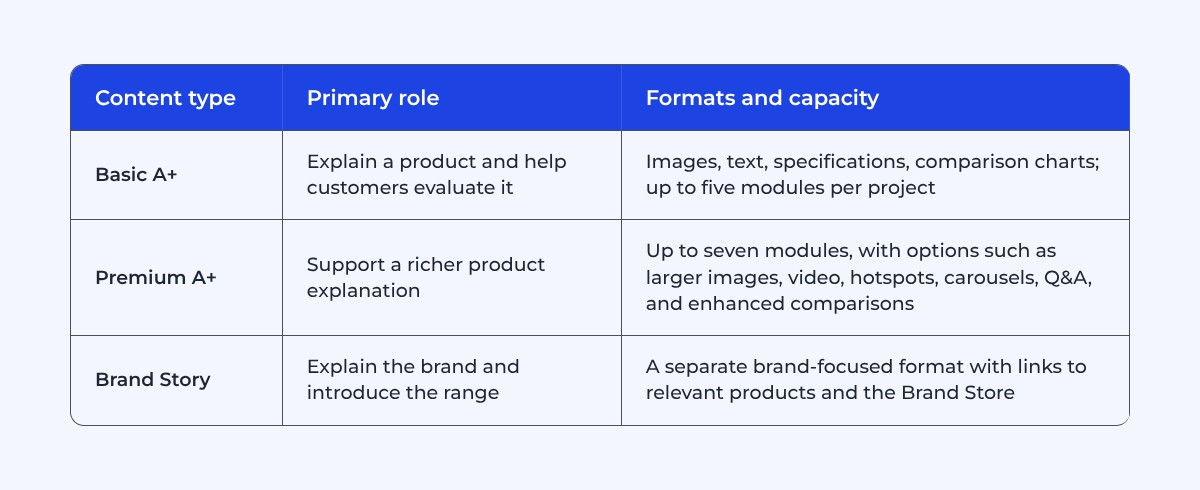
Basic and Premium are alternative enhanced-description types for a listing; Brand Story can complement them. Choose the format based on what the customer needs to understand, the assets available, and your account’s eligibility.
Amazon’s current A+ tool page describes seller access through a Professional account and appropriate Brand Registry roles, with a route for eligible generic products as well. Premium has additional eligibility requirements. Vendors have their own access arrangements, described in Amazon Ads’ creative-content guidance. Check the available options in your account before commissioning a format.
Amazon reports potential sales increases of up to 8% for Basic A+ and up to 20% for well-implemented Premium A+, citing internal data. Those are potential outcomes rather than a forecast for your ASIN. They also do not establish the effect of a particular module or design.
For setup and account administration, use Algofy’s guide to Amazon A+ Content. The focus here is how to evaluate examples and turn them into a useful creative brief.
Eight Documented Amazon A+ Content Examples
1. Sony: Help Shoppers Understand Technical Differences

Category: Electronics. Shopping problem: Choosing between products with similar-looking specifications.
In Amazon’s Sony case study, Sony’s channel marketing manager describes leading with important benefits, using lifestyle imagery and video, and using comparison charts or Q&A to explain technical products. The account also describes updating content in response to customer questions.
The useful lesson is prioritization. A long specification list needs an explanation of which differences matter to the customer. Someone choosing a television or pair of headphones should not need to interpret every technical term before understanding why one option fits their needs.
How to apply it: Identify the decisions your range creates. Choose comparison rows that distinguish the models: compatibility, dimensions, key functionality, or included accessories. Explain unfamiliar features in product-specific terms before asking shoppers to compare them.
For a hypothetical headphone range, “connection type,” “microphone use,” and “folding design” may help more than a row repeating the same brand slogan under every model. Use accurate specifications for each product and avoid making a cheaper model appear unsuitable through selective or misleading comparisons.
2. Jackery: Connect Product Capabilities to Real Situations

Category: Portable power. Shopping problem: Understanding what a technical product can do in a particular situation.
Amazon’s design guide describes Jackery combining lifestyle carousels with specifications, questions and answers, and comparisons.
That progression is useful for products where the intended use matters as much as the headline specification. Someone planning a camping trip and someone researching home backup may need different explanations from the same product family.
How to apply it: Begin with a credible use situation, then connect the capability to an understandable outcome. State the assumptions behind performance figures. For a power product, runtime depends on the load and operating conditions; a large runtime claim without those conditions can mislead.
3. Dokotoo: Make Fit and Product Appearance Easier to Judge

Category: Apparel. Shopping problem: Understanding how a garment looks and selecting a size.
Amazon’s guide describes Dokotoo using lifestyle video, product imagery, descriptive copy, and sizing information. The example shows why apparel content needs to go beyond a polished campaign image.
How to apply it: Build the explanation around fit, fabric, coverage, and movement. Use views that reveal relevant details rather than several near-identical poses. Show the actual product variation and provide clear garment measurements with units.
Do not make essential sizing guidance available only as small text inside a wide image. Mobile readability is especially important when a decision depends on a measurement.
4. Uproot Clean: Explain the Problem, Use, and Product Choice

Category: Home and cleaning. Shopping problem: Deciding whether a tool suits the surface and task.
Amazon documents Uproot Clean’s pet-hair problem story and its use of video, carousels, Q&A, and comparisons.
How to apply it: Demonstrate the task under representative conditions. Explain suitable surfaces, the method of use, and any relevant limitations. Help customers select between tools designed for different jobs.
5. Garden of Life: Give Brand Trust a Specific Foundation

Category: Health and wellness. Shopping problem: Understanding the brand and navigating its range.
On Amazon’s A+ tool page, a Garden of Life brand manager describes using A+ for brand storytelling, catalog discovery, and trust.
How to apply it: Decide which trust questions you can answer with evidence about the actual product. Explain ingredients, format, quantity, serving information, and relevant product distinctions accurately. Where you reference certification or testing, confirm what it covers, who issued it, and which product or batch it applies to.
Keep product facts separate from promised health outcomes. A verified ingredient does not, by itself, substantiate every claim a marketer might attach to it. Have the appropriate product and regulatory reviewers approve claims before they become artwork.
6. Kazi: Connect the Product to a Meaningful Brand Story

Category: Home goods. Shopping problem: Understanding what distinguishes a handmade product beyond its appearance.
Amazon’s Kazi case study describes using A+ alongside advertising to explain the brand’s handmade products and fair-wage mission.
The lesson is relevance. The story helps explain the people, process, and values connected to the product. It gives a shopper information that a standard product image alone would not convey.
How to apply it: For a maker-led brand, document how the product is made and why that process matters. Use authorized imagery and support claims about materials, origin, and employment practices. Keep the product itself easy to evaluate: size, contents, care, and intended use still need clear answers.
7. Binibi: Show How the Product Is Experienced

Category: Children’s bilingual books. Shopping problem: Understanding the experience a product creates, beyond the object shown on the page.
Amazon’s Binibi case study describes Premium A+ used for the brand story, product features, benefits, and lifestyle imagery. Advertising also formed part of the wider program, so its business results should not be attributed to A+ alone.
How to apply it: For an interactive product, demonstrate what the customer or recipient does with it. Explain included content, operation, language, setup, or other relevant details using the actual product’s specifications.
8. Puffin: Make a Distinctive Product Idea Clear on Amazon
Category: Drink accessories. Shopping problem: Understanding an unfamiliar product concept and choosing the right version.
Algofy’s Puffin case study documents an Amazon launch supported by listings, a Brand Store, A+ Content, sponsored advertising, and off-Amazon search activity. Puffin’s drink holders take inspiration from outdoor clothing.
The useful creative question is how to make that recognizable idea understandable in a marketplace product page. The source establishes that A+ was part of the work; it does not isolate an A+-only effect.
How to apply it: For a product with a distinctive shape or concept, establish what the item is, what it fits, and how it is used before leaning heavily on personality. Show scale and compatibility where those determine whether the product is suitable.
Which Module Should Answer Each Shopper Question?
Choose the shopping question first, then the module. This prevents a common production problem: selecting a visual template and trying to invent enough content to fill it.
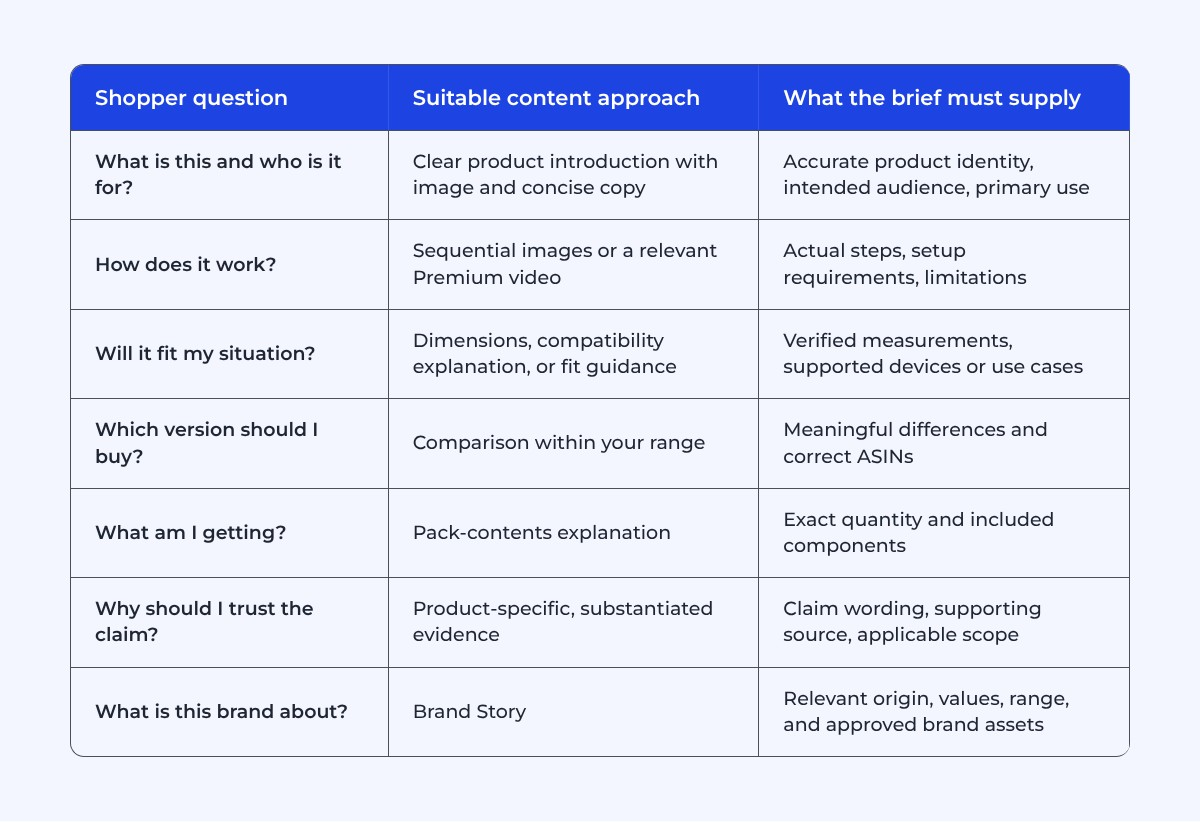
Write the Page as a Sequence of Decisions
An effective sequence changes what the shopper understands at each step. Start by orienting them. Then explain the differences or details that affect suitability. Resolve remaining questions before introducing additional products.
Avoid opening with a decorative slogan that could describe any item in the category. “Made for everyday adventures” may fit the brand voice, but it does not explain whether a product is a bottle, a bag, or a charger. Pair personality with a clear product statement.
Use Comparisons to Help Selection
Choose rows that actually differ and matter. If three products have identical material and care requirements, repeating those facts across the chart may add little. Capacity, fit, included accessories, and intended task can be more useful differentiators when accurate.
When Is Premium A+ Worth the Extra Production Work?
Premium offers more presentation options, but those options also need better assets and maintenance. Decide what the upgrade will help the customer understand before planning a new shoot.
Use Video When Motion Explains Something
A useful video can demonstrate assembly, handling, operation, or the relationship between components. A static product may not need a cinematic sequence if the same information is clearer in one image and a caption.
Use Hotspots When the Detail Is Spatial
Hotspots are useful when a feature is best explained at a particular location: a control, attachment, compartment, or material area. Avoid placing many markers on an image simply to repeat the same benefit.
Use Q&A for Genuine Unresolved Questions
Build the questions from recurring customer uncertainty: fit, compatibility, quantity, operation, or care. Give direct, product-specific answers.
How Should Brand Story Work With Product-Level A+?
Brand Story explains who the brand is and helps people explore its products. Product-level A+ should explain the item they are considering. Amazon’s content-type guide identifies these as separate jobs.
For a founder-led brand, Brand Story might explain the problem that prompted the product line. On the product page, A+ can then focus on dimensions, selection, use, and differences. The shopper gains context without reading the same origin paragraph repeatedly.
How Do You Produce Readable, Accurate A+ Content?
Start With Evidence About the Customer’s Questions
Review your product questions, support conversations, returns, and relevant reviews. Identify repeated misunderstandings and the information needed to resolve them. Competitor reviews can suggest questions to investigate, but verify the answer against your own product.
Plan for Mobile From the Start
Use the current specifications for the actual module selected. There is no single universal image dimension that fits every Basic, Premium, and Brand Story asset.
Use supported text fields where appropriate rather than flattening every explanation into artwork. Essential information should remain readable at the displayed size. If an image needs several lines of small print to avoid being misleading, rethink the claim or layout.
Check the mobile and desktop previews, then inspect the published result. Watch for cropped labels, tiny comparisons, text over busy photography, and details that depend on hover behavior. Do not assume automatic resizing produces an effective mobile composition.
Review Claims and Permissions Before Export
Use Amazon’s A+ guidelines and the requirements applicable to the product category. Amazon’s public guidance restricts manually inserted promotional details, off-Amazon contact directions, unsupported superlatives, and competitor references. Substantiate applicable awards and endorsements.
How Should You Test and Measure A+ Content?
Use Manage Your Experiments Where Eligible
Amazon’s Manage Your Experiments supports experiments on listing content, including A+ and Brand Story. Amazon describes randomized groups and results including sales, conversion, units per unique visitor, and sample size. Access and ASIN eligibility depend on the applicable account and product requirements, including sufficient traffic.
Interpret the Result at the Right Level
A whole-listing conversion metric does not reveal how many visitors saw a particular A+ module. Do not claim that a specific banner caused an uplift unless the test design supports that conclusion.
Review Checklist Before You Submit
- Can a new visitor identify the product and its intended use quickly?
- Does each section answer a different, relevant customer question?
- Are dimensions, materials, contents, and compatibility correct for the assigned ASINs?
- Are claims supported and approved for the applicable market and category?
- Can essential information be understood without sound or optional interaction?
- Are the actual module specifications and mobile previews checked?
- Do comparisons and product links point to relevant, correct items?
- Are Brand Story and product-level explanations complementary?
- Have you removed prohibited promotions, off-Amazon directions, and unsupported claims?
- Is someone responsible for the version, measurement plan, and future updates?
Frequently Asked Questions
What Are Good Amazon A+ Content Examples?
Sony, Jackery, Dokotoo, and Uproot Clean are documented examples for technical explanation, use cases, fit, and problem-led storytelling. Garden of Life, Kazi, Binibi, and Puffin offer further lessons in brand context and product communication. Study the lesson relevant to your product rather than treating the brands as a conversion leaderboard.
How Many Modules Can I Use?
Amazon’s current type-comparison guide lists up to five modules for Basic A+ and seven for Premium A+. These are capacities, not evidence that every page performs best when every slot is filled. Use the supported format that communicates the product clearly.
Do I Need Premium A+ to Create a Useful Page?
No. Basic can communicate a clear offer through images, text, specifications, and comparisons. Premium is useful when its additional formats help explain the product and the production investment is justified. Check eligibility before planning Premium-only assets.
Does A+ Content Improve Amazon SEO?
Not directly. Amazon has not confirmed that A+ Content text counts toward search ranking, so keep your keywords in titles, bullet points, product attributes, and backend search terms. A+ Content can still support rankings indirectly when it improves conversion and sales, but there is no guaranteed ranking lift.
How Much Does A+ Content Cost?
Amazon’s tool page describes A+ as available without a separate content fee to eligible sellers. Account, production, photography, video, design, agency support, and maintenance costs are separate. Confirm the terms applicable to the content type in your account.
Turn the Examples Into a Better Product Explanation
The most useful lesson across these examples is to make the buying decision easier. Explain suitability, show the product accurately, support the claims, and give comparisons a clear purpose.
Start with the customer question your current listing leaves unanswered. Build the next version around it, then evaluate what changed.
Algofy’s Amazon creative services include A+ Content, product imagery, listings, and Brand Stores. Book a call with our team to turn your product’s strongest evidence and most important customer questions into a clearer Amazon experience.